

Oriel
Audits that used to take an afternoon of two systems side by side and a spreadsheet, done end to end on the hospital's own servers. Every finding carries its evidence, every decision carries a name, and nothing is changed in a clinical system on Oriel's own.
Oriel is a working prototype shown on a fictional demo hospital with synthetic data only. It is not a medical device and is not for clinical use. It drafts and flags for people to decide; it does not diagnose or change clinical records. A clinical safety case and information-governance approval come before any use with real patient data. Oriel is a working name.
Clinical Audit
Oriel
Who it’s for
Audit leads, department managers, clinical governance and quality teams, and the IT and information-governance staff who deploy for them, starting with the cath lab and imaging and extending to pathology, pharmacy, research and any department that audits against a standard.
Problem
Every department runs audits: device coding, radiation dose, missing images, turnaround times, controlled drugs, consent. Most are still done by hand by reading one system against another, so they are slow, sampled rather than complete, and hard to repeat the same way next month.
Watch Oriel
Walkthroughs and short videos recorded from the real product.
Oriel: the full demo
4:08A pacemaker coding audit from start to finish: ask in plain words, approve the plan, review every case with its evidence, then guidance, computer use, the report, sign-off, workflows and support. Fictional demo hospital, synthetic data.
Oriel in 35 seconds
0:35Clinical audit on the hospital's own servers, with people deciding every finding.
How it works
- 1
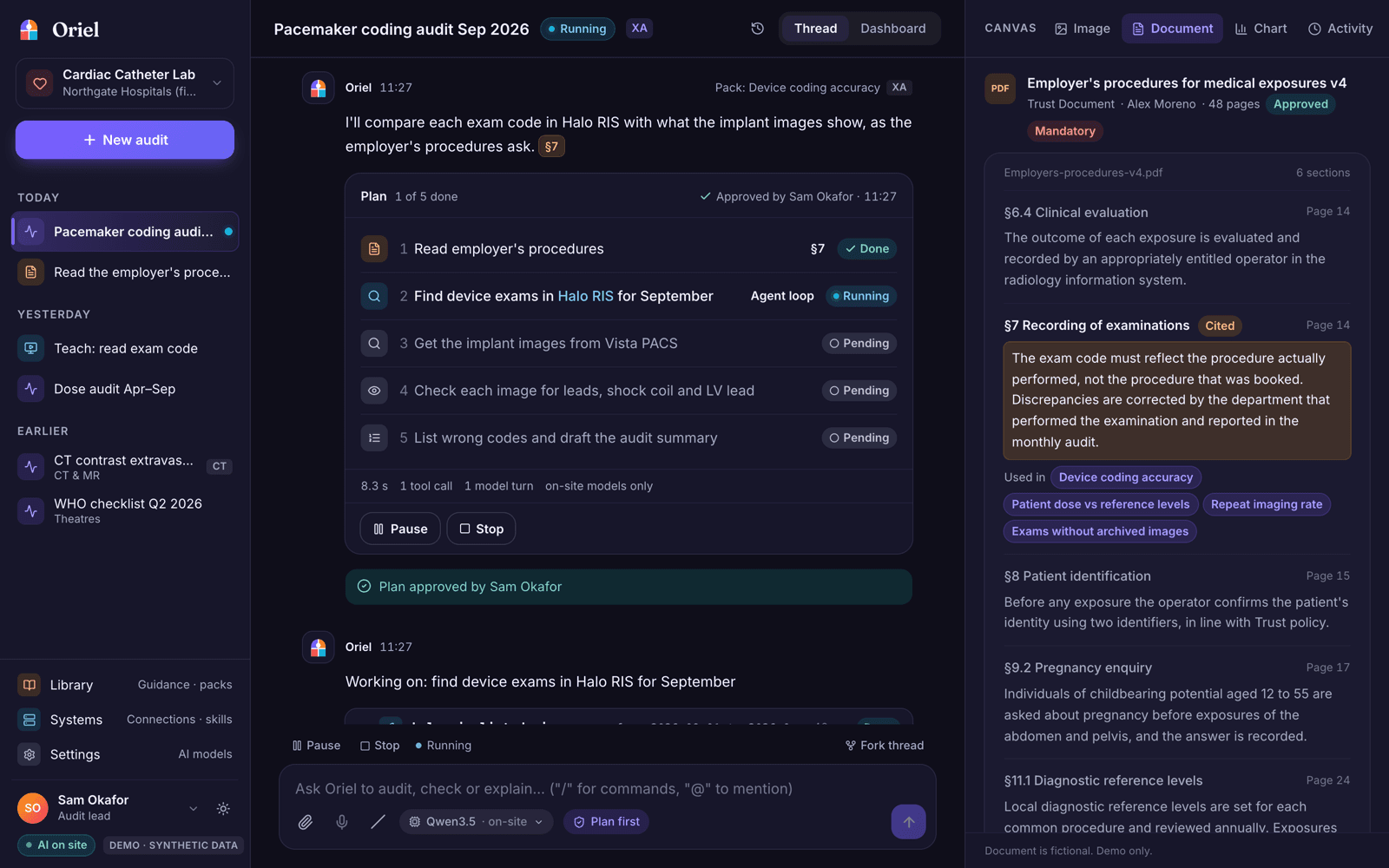
Ask in plain words what you want to check, for example September's pacemaker exams in the RIS against the implant images in PACS. Oriel writes a plan saying what it will read, where, and which part of the local procedures applies. Nothing runs until a person approves it.
- 2
Once approved, it works through every case using standards-based connectors (FHIR, DICOMweb, HL7 v2) or, where a system has no interface, on screen through a workstation runner that masks patient names and stops the moment staff touch the mouse. The canvas fills with the evidence as it goes.
- 3
Each finding arrives with its evidence and a reason. A person agrees or changes it with a note. Oriel then drafts the audit report in the department's own template, cited to the guidance and the cases, for sign-off. The audit can be saved as a versioned pack, a schedule or a workflow and run again.
Key features
- Plain-language audits with a plan to approve before anything runs, and pause, stop or fork at any step
- Evidence on every finding, decided by a named person; Oriel never corrects a record on its own
- Audit packs as versioned data, drafted from a description and approved by governance, plus a standards library
- Guidance answers cited to the section and page of the Trust's own documents
- Connectors for FHIR R4, DICOMweb PACS and HL7 v2 over MLLP with TLS
- Computer use on workstations for systems without an interface, with masked screenshots and a Stop banner
- Report drafting in the department's own DOCX or PDF template, with export and sign-off
- Schedules and workflows triggered by hand, by a webhook, on a timetable or when an audit finishes, with email and in-app notifications
- Models run on site and every step has a non-AI fallback; role-based access and a full action log
- Desktop app for one PC, or a server install with encrypted backups, readiness checks and a scrubbed support report
Inside Oriel
Screens from the current build. Details may change as the product develops.
Example journey
Step 1
Ask
Describe the audit in plain words, or pick a pack from the library.
Step 2
Approve the plan
See what Oriel will read and which standard applies, then approve it, edit it or cancel.
Step 3
Decide the findings
Review each case with its evidence and agree or change it, with a note.
Step 4
Sign off and repeat
Confirm the drafted report, then save the audit as a schedule or workflow for next month.
Get updates
Current status: Pilot